This review page is supported in part by the sponsors whose ad banners are displayed below |
 |
 |
When I added the attenuator to the Magnum however, playback became a little too laid back. Dynamics and transient fidelity suffered slightly. I preferred the Magnum sans attenuator. Your mileage could vary. Since the Magnum contains network circuits which already address reflections, jitter and other digital nasties, perhaps this was too much of a good thing? For further evidence my Audiomat Tempo DAC lost signal lock with my CEC transport when I used the attenuator atop the MIT cable. However it worked fine with the Silver Sonic cable. I’m guessing the additional attenuation on top of the Magnum’s own plus the lower output voltage of the CEC reduced the signal to below where my Audiomat DAC could lock to it. Since these attenuators are inexpensive and available in a variety of values they might be worth experimenting with since it appears that adding an attenuator to a budget digital cable might reap sonics similar to more upscale SOTA cables at a fraction of the price.
Regarding USB and S/PDIF cables, John states that with the MK3 and attenuator, there shouldn’t be audible differences. I disagree. I could easily tell one cable from the other, be it USB or S/PDIF. So could my eldest son whom I coerced into a little blind listening test. While there’s nothing wrong with the budget Belkin and DH Labs, the $180 Cardas Clear USB and $1.200 MIT Magnum Digital were richer, more dimensional and more revealing of texture and musical detail. Having said that I think sticking with the Belkin USB and D-75 is more in line with the MK3’s price and frankly doesn’t give up that much especially with the attenuator fitted to the D-75. I’d say this nets 85% of the performance at about 1/12th the price.
|
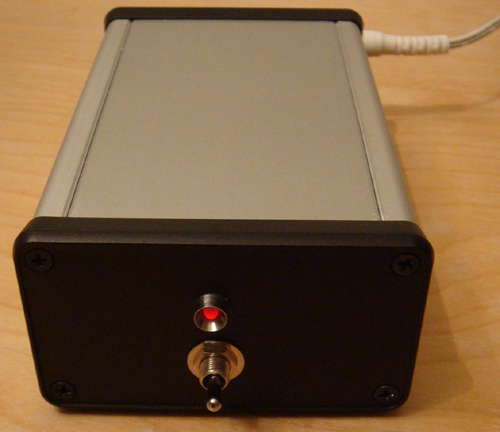 |
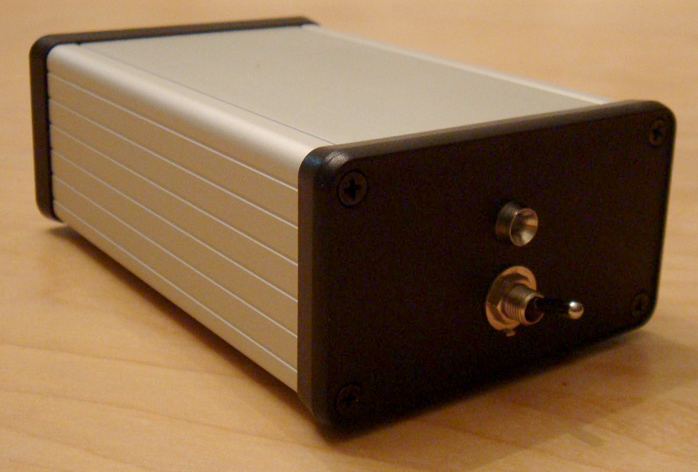
Towards the end of my review John suggested to like the hiFace connect the MK3 directly to my laptop with a Type A-to-B USB adaptor thus ditching the USB cable altogether. I purchased such an adaptor but could not connect the MK3 to my laptop. There wasn’t enough room between S/PDIF connector and laptop to connect a digital cable. Perhaps John could offer a version of the MK3 with the digital output and USB on opposite ends of the box not unlike the stock hiFace or the two Audiophilleo models?
Since I had both MK3 and USB-ready Calyx DAC 24/192 in house, I wondered if adding the MK3 and a S/PDIF cable to the latter would level the playing field as I’d preferred the Calyx USB input to its S/PDIF. |
|
I thus ran the Cardas USB cable from laptop to MK3 which connected to the Calyx’s coaxial input via MIT Magnum. Then I switched drivers from the Calyx Thesyscon ASIO to M2Tech’s Kernel Streaming in Windows Control Panel and J. River’s Media Center 17, picked some music and hit play.
|
|
|
|
 |
Wow. Not only did music sound as good via S/PDIF as USB direct, it actually went up a notch or two. Along with the beguiling smoothness, flow and ease I noted in my Calyx review, I observed a tad more texture and harmonic richness in the midrange but also a greater degree of finesse, micro detail and openness in the top end. Cymbals had more shimmer and the sense of wood hitting metal seemed more real and lifelike. Dynamics also received a good kick in the pants. Prior to this little experiment I was sure that adding more stuff to the signal path would have to negatively impact performance but that’s not what I heard.
|
|
I suspect that inserting the MK3 introduced an added stage of jitter reduction or perhaps superior isolation from my computer's RF noise and any potential ground contamination of its battery-powered supply. Yet I don’t think that purchasing a USB-S/PDIF converter and digital cable for an already USB-equipped DAC makes a whole lot of fiscal sense. As good as the Calyx is, I wouldn’t sell my Tempo 2.6 just to get USB. The MK3 and Audiomat Tempo 2.6 combo was clearly superior. Yet the $150 stock hiFace remains a musically satisfying piece of kit which I continue to recommend to those on a tight budget or content to carefully dip their toes into computer audio.
|
 |
But as with all things audio, food, wine or any vice, once you have a taste of the good stuff, it’s difficult to settle for less. The JKSPDIF MK3 is most definitely the good/better stuff and an excellent option for anyone wanting to play music from a computer who is unwilling to replace an existing premium DAC for an USB-enabled converter. After spending several weeks with the JKSPDIF MK3, I frankly could care less if a DAC had USB or not. With this little gizmo it’s a non-issue. My advice? Buy the best DAC you can afford and if it doesn’t do USB, don’t fret. The JKSPDIF MK3 has your back. |
|
|
|
|
|
Quality of packing: Excellent.
Reusability of packing: Appears reusable several times.
Quality of owner's manual: Everything you require.
Condition of component received: Flawless.
Completeness of delivery: Perfect.
Website comments: Decent info and pictures.
Human interactions: Professional and friendly.
Pricing: Good value.
Final comments & suggestions: None.
|
 |
 |
Addendum: Just prior to wrapping up this assignment, I finally caved in to John’s prodding and downloaded and installed the trial version of JPlay v4.1 which also includes plug-ins for JRiver, iTunes and Foobar. Early indications suggest a staggering improvement in sound quality over JRiver sans plug-in depending on what settings are used. Needless to say I’ve obtained the full release for review. Until then you need to try this software if you are using a Windows 7 PC as digital source. It will blow your mind. |
|
|
|
 |
 |
|
 |